AI background removal and subject detection
Detect a product, person, or object, remove a complex background, and preserve edges for product images, portraits, and content assets.
Product 04 · Image workspace
Convert images to the right format with WebP support, batch processing, and broad input compatibility.
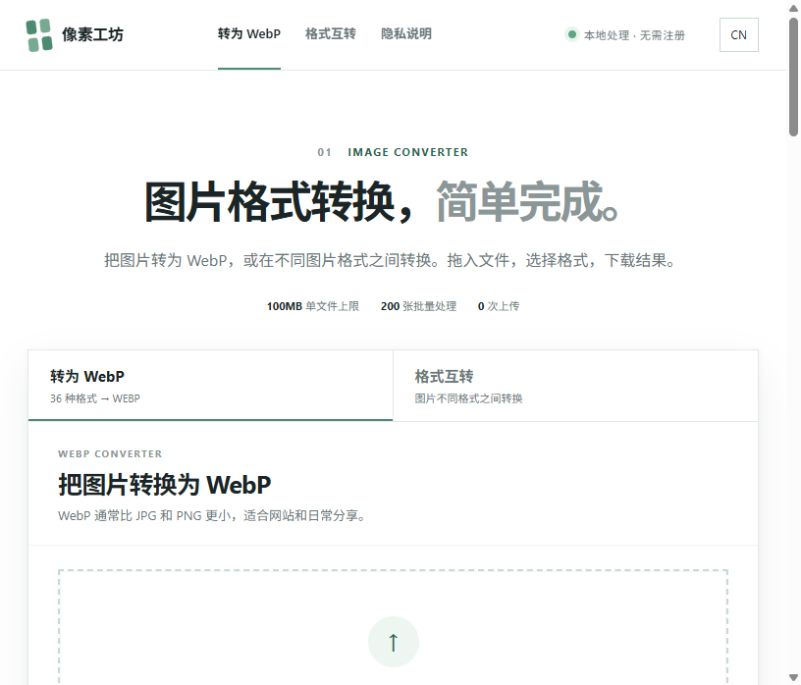
Product interface
The image above shows the product's current interface. Each tool runs as an independent website and can be opened directly to use its available features.
Open PixelFormatFeature overview
PixelFormat is a browser-first image conversion workspace. It supports WebP conversion, common formats such as JPG, PNG, JPEG, SVG, BMP, and AVIF, and a single workflow for processing images in batches.
35 validated input formats
Conversion among common formats including JPG, PNG, and WebP
Batch processing for up to 50 images
Individual downloads or a ZIP of results
Applied AI research
Planned capabilitiesBuilding on current format conversion and batch processing, our planned research covers AI background removal, subject detection, smart crop, and enhancement for practical publishing workflows.
Detect a product, person, or object, remove a complex background, and preserve edges for product images, portraits, and content assets.
Compose an image for a website, document, social network, or marketplace while supporting denoise, clarity, and low-quality image repair.
Apply a shared background, ratio, padding, size, and output quality across an image set for repeatable production work.
Users receive more than a different file format: they get an image closer to publication, presentation, or delivery requirements.
AI image processing should be user-initiated and clearly distinguish originals from generated results. People, copyrighted work, and commercial assets still require permission and review.
How it works
Drop files into the page or select them from the device. Common formats are supported and unusual formats receive a clear parsing status.
Select WebP or another supported format and review quantity, size limits, and batch status.
Download a single image directly or package several results into a ZIP, with processing completed in the browser.
Use cases
Prepare the right image format for a website, social post, or document.
Convert images to WebP for more efficient web use.
Process a batch without opening and exporting each image separately.
Who it is for
For website operations, design collaboration, content production, information organization, and individuals or small teams that need fast image conversion.
Data handling and limitations
Images are processed in the current tab through browser APIs, Canvas, and device memory. Original files are not uploaded or stored by the product.
Image conversion depends on device memory, browser decoding support, and input size. Complex, unusual, or damaged files may not parse.