Intelligent extraction and summaries
Identify headings, paragraphs, tables, and key information, produce a reviewable summary, and link important points back to their pages.
Product 02 · PDF tools
A browser-first PDF workspace for office, education, scanning, and archive tasks.
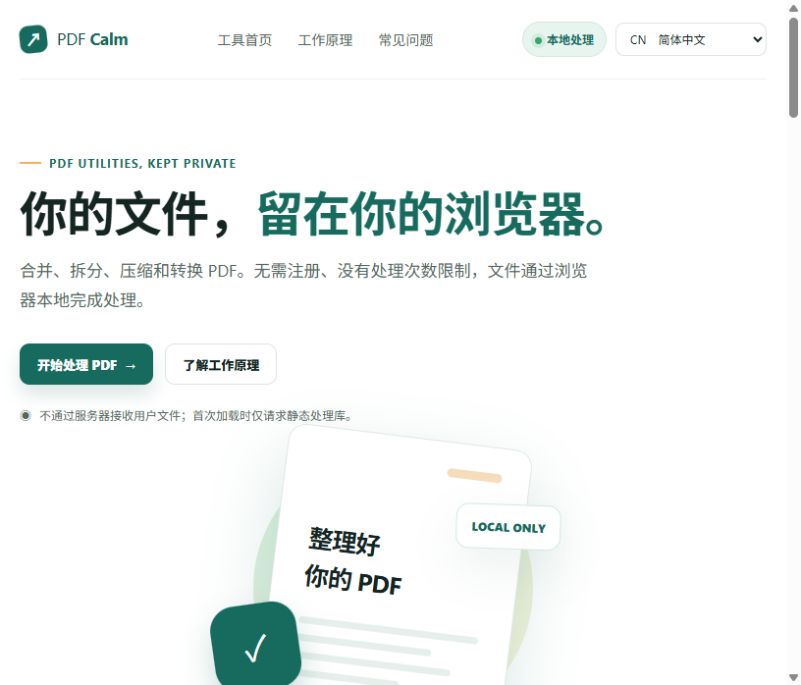
Product interface
The image above shows the product's current interface. Each tool runs as an independent website and can be opened directly to use its available features.
Open PDF CalmFeature overview
PDF Calm brings common PDF tasks into one focused workspace: merge, split, compress, rotate, organize pages, run OCR, convert images and PDFs, edit metadata, add page numbers and watermarks, and flatten forms.
Merge, split, compress, rotate, and organize pages
OCR scanned PDFs and export TXT, JSON, or searchable PDF
Convert JPG, PNG, and WebP to PDF, or PDF pages to images
Watermarks, page numbers, metadata, and form flattening
Applied AI research
Planned capabilitiesBuilding on PDF Calm's current merge, split, OCR, and page tools, our planned research covers document structure, extraction, summaries, and organization with explicit data-flow choices when models are involved.
Identify headings, paragraphs, tables, and key information, produce a reviewable summary, and link important points back to their pages.
Use document content to support naming, grouping, splitting, and ordering across reports, scans, course materials, and archives.
A request such as “extract every table” or “separate attachments by topic” could be understood by AI and routed to the right PDF operations.
Repeated file operations become one goal-driven workflow, leaving more time for reading, judgment, and using the information.
Document intelligence should keep data boundaries visible. Tasks that can run locally should stay local; any external model use should require an explicit choice and a clear explanation of data flow.
How it works
Select one or more PDFs, images, or scans. The current page reads them and builds a working queue.
Preview pages, change order, select an output, and set page ranges or OCR options when needed.
Run the task in the browser, review the result, and download a file or ZIP without creating an account.
Use cases
Organize contracts, reports, scans, and course materials.
Combine several files into a PDF that is easier to share or archive.
Prepare page order, text layers, formatting, and metadata before sending a document.
Who it is for
For office administration, education and research, scanning and archives, small businesses, and individuals who need an occasional document workflow.
Data handling and limitations
Files are read through browser APIs and core processing is designed to happen locally without uploading user documents to PDF Calm.
Large or long documents depend on device memory and browser performance. OCR and lossy compression results should be reviewed after download.