Generate code content by use case
A user could describe an event check-in, Wi-Fi share, product label, or contact exchange while AI organizes the required fields and template.
Product 05 · QR & barcode toolkit
Generate, scan, validate, and export QR codes and barcodes for sharing, work, and labels.
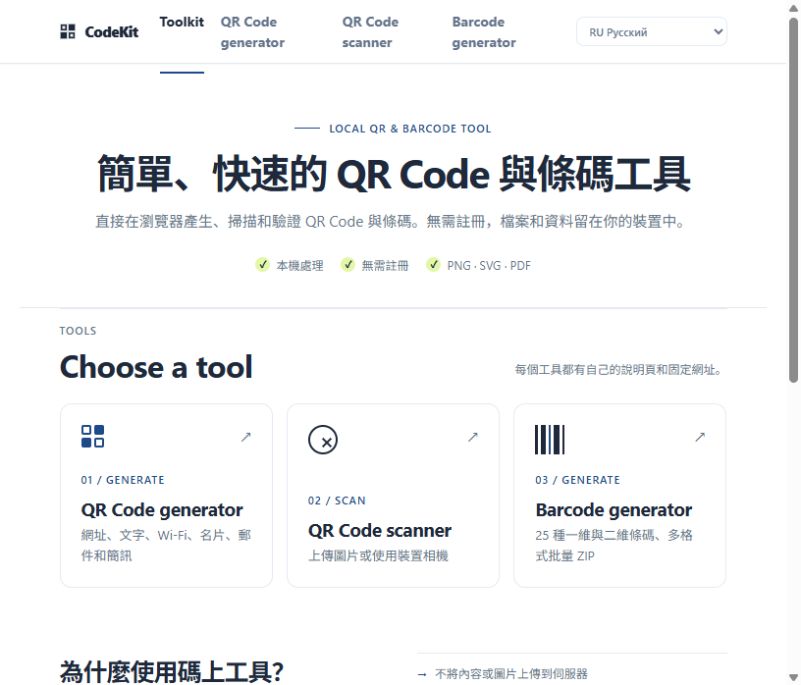
Product interface
The image above shows the product's current interface. Each tool runs as an independent website and can be opened directly to use its available features.
Open CodeKitFeature overview
CodeKit is a browser-first set of QR code and barcode tools. It supports URL, text, Wi-Fi, contact, email, and SMS templates, as well as scanning, barcode generation, format checks, and PNG, SVG, and PDF output.
QR codes for URLs, text, Wi-Fi, vCard, email, and SMS
Image upload and camera scanning
EAN-13, UPC-A, Code 128, and Code 39 barcodes
PNG and SVG export, plus browser printing to PDF
Applied AI research
Planned capabilitiesBuilding on current generation, scanning, and validation, our planned research covers use-case-based content setup, scan explanations, and batch labeling while preserving coding and security boundaries.
A user could describe an event check-in, Wi-Fi share, product label, or contact exchange while AI organizes the required fields and template.
After scanning, AI could explain the content type, format completeness, and suspicious link characteristics before the user takes action.
Organize code values, names, and export rules from product, asset, or logistics lists to reduce repeated data entry.
QR codes and barcodes become more than image files: they become practical entry points connecting information, objects, people, and the next action.
AI can help structure and inspect content, but it does not replace GS1 allocation, enterprise data governance, or security validation. Users still confirm links and label data.
How it works
Select a URL, text, Wi-Fi, contact, email, SMS, or barcode format and provide the relevant content.
Review length, contrast, logo coverage, check digits, and other factors that may affect scanning.
Export PNG or SVG, print to PDF, or inspect scanned content as text before copying or opening it.
Use cases
Create a QR code for an event, Wi-Fi network, contact, or link.
Inspect the contents of a QR code or barcode in an image.
Generate code images for retail, logistics, and everyday labels.
Who it is for
For events, office sharing, Wi-Fi setup, contact exchange, retail labels, logistics labels, and everyday QR use.
Data handling and limitations
Standard generation and scanning tasks are designed to run locally. Scan results are shown for review and links are not opened automatically.
Retail barcode numbers must be assigned by GS1 or another authorized body. QR readability also depends on print quality, size, contrast, and environment.